

Giáo án Tiếng Anh Lớp 9 - Tuần 12 - Võ Kim Trí - Năm học 2020-2021
Match the pictures to the descriptions. Check with a partner. Listen and repeat. (CD1 – 26)
1. Have students match the pictures to the definitions.
2. Have students check with a partner.
3. Check answers as a whole class.
 10 trang
19/04/2024
2340
10 trang
19/04/2024
2340
Bạn đang xem tài liệu "Giáo án Tiếng Anh Lớp 9 - Tuần 12 - Võ Kim Trí - Năm học 2020-2021", để tải tài liệu gốc về máy hãy click vào nút Download ở trên.
Tóm tắt nội dung tài liệu: Giáo án Tiếng Anh Lớp 9 - Tuần 12 - Võ Kim Trí - Năm học 2020-2021
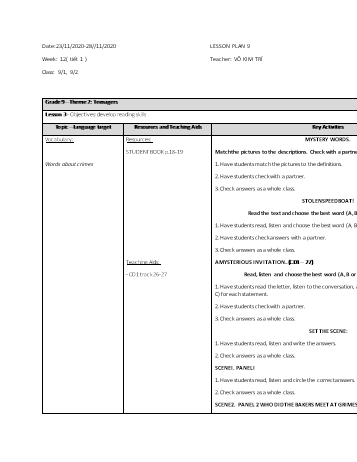
Date:23/11/2020-28//11/2020	LESSON PLAN 9
Week: 12( tiết 1 )	Teacher: VÕ KIM TRÍ
Class: 9/1, 9/2
Grade 9 – Theme 2: Teenagers Period 14-15
Lesson 3 - Objectives: develop reading skills
Topic – Language target
Resources and Teaching Aids
Key Activities
Vocabulary:
Words about crimes
Resources:
STUDENT BOOK p.18-19
Teaching Aids:
- CD1 track 26-27
MYSTERY WORDS.
Match the pictures to the descriptions. Check with a partner. Listen and repeat. (CD1 – 26)
1. Have students match the pictures to the definitions.
2. Have students check with a partner.
3. Check answers as a whole class.
STOLEN SPEEDBOAT!
Read the text and choose the best word (A, B or C) for each space.
1. Have students read, listen and choose the best word (A, B or C) for each space.
2. Have students check answers with a partner.
3. Check answers as a whole class.
A MYSTERIOUS INVITATION... (CD1 – 27)
Read, listen and choose the best word (A, B or C) for each statement.
1. Have students read the letter, listen to the conversation, and choose the best word (A, B, or C) for each statement.
2. Have students check with a partner.
3. Check answers as a whole class.
SET THE SCENE:
1. Have students read, listen and write the answers.
2. Check answers as a whole class.
SCENE I. PANEL I
1. Have students read, listen and circle the correct answers.
2. Check answers as a whole class.
SCENE 2. PANEL 2 WHO DID THE BAKERS MEET AT GRIMES HOUSE?
Read, listen and write the answers.
1. Have students read, listen and write the answers.
2. Check answers with the whole class.
SCENE 3. PANELS 3-5
Listen to Grimes' will and write the letter next to each person.
1. Have students draw lines to match the people to the things they get.
2. Have students write who can live in the house.
3. Check answers as a whole class.
INTERVIEWS.
1. Divide the class into fours.
2. Have Student C turn to page 104, File 2 and Student D turn to page 106, File 7.
3. Have students role-play the other guests and interview them.
Now, listen to the whole story again without pauses.
4. Swap roles. Have Student A turn to page 108, File 13 and Student B turn to page 110, File 18.
5. have students write
6. Swap roles and repeat.
7. Have students discuss in their group how the other guests feel.
8. Have some students share their ideas with the class.
Grade 9 – Theme 2: Teenagers Period 15-16
Lesson 3 - Objectives: develop reading skills
Topic – Language target
Resources and Teaching Aids
Key Activities
Vocabulary:
Words about crimes
Resources:
- WORKBOOK p.16-17
New words
Complete the words with the vowels and y
1. Have students look at the pictures.
2. Demonstrate the activity using the example.
3. Have students complete the words with the vowels and y.
4. Have students match the words to the correct pictures.
5. Divide the class into pairs and have them check their findings.
6. Check answers as a whole class.
Story
a. Label the pictures using the words in the boxes
1. Demonstrate the activity using the example.
2. Have students label the pictures.
3. Have students check their answers with a partner.
4. Check answers as a whole class.
b. Read and complete the sentences
1. Demonstrate the activity using the example.
2. Have students read and complete the sentences using the phrases in the box.
3. Have students check their answers with a partner.
4. Check answers as a whole class.
c. Read and circle True or False
1. Demonstrate the activity using the example.
2. Have students read and circle true or false.
3. Have students check their answers with a partner.
4. Check answers as a whole class.
d. Read and write the answers
1. Demonstrate the activity using the example.
2. Have students read again and write the answers.
3. Have students check their answers with a partner.
4. Check answers as a whole class.
Remarks:
HS tiếp thu bài còn chậm.
Một số em trung bình và yếu không học từ mới tốt.
Date:23/11/2020-28//11/2020	LESSON PLAN 9
Week: 12( tiết 2 )	Teacher: VÕ KIM TRÍ
Class: 9/1, 9/2
Grade 9 – Theme 2: Teenagers Period 16-17
Lesson 4 - Objectives: by the end of this lesson, students can follow and give instructions to create rename and delete folders
Topic – Language target
Resources and Teaching Aids
Key Activities
Vocabulary:
Words about computer
Grammar:
Use the sequence markers
Resources:
STUDENT BOOK p.20-21
Teaching Aids:
- CD1 track 2-4
Aim
1. Have students look at the lesson aims as you read them aloud.
2. Have students look at the examples from the Useful Language box.
3. Explain that by the end of the lesson, they'll be able to use the same language.
New words
a. Fill in the blanks. Check with a partner. Listen and repeat.
1. Demonstrate the activity using the example.
2. Have students fill in the blanks.
3. Divide the class into pairs and have students check their answers with their partners.
4. Play audio. Have students listen and repeat.
b. With your partner, talk about what you use a computer for. Share with the class.
1. Have students talk about what they use a computer for.
2. Elicit answers and write them on the board.
Listening
a. You will hear a conversation in an IT class. Listen and fill in the blanks.
1. Play audio and demonstrate the activity using the example.
2. Play audio. Have students listen and fill in the blanks.
3. Play audio again and check answers as a whole class.
b. Circle the correct words. Listen again and check.
1. Demonstrate the activity using the example.
2. Have students circle the correct words
3. Play audio again. Have students listen and check.
Useful language
Listen then practice
1. Have students look at the Useful Language box.
2. Play audio. Have students listen to the useful language.
3. Have students practice the useful language.
Reading
a. Read the article and circle "True" or "False".
1. Have students read the text individually.
2. Read the text as a whole class.
3. Demonstrate the activity using the example.
4. Have students circle "True" or "False".
5. Check answers as a whole class.
b. Who is the blog written for? Choose the best answer.
1. Have students read the text again and choose the best answer.
2. Check answers as a whole class.
Speaking
How to Use a Computer
a. You're members of the IT Club at school. You're making four videos to help teenagers who are new to computers. Work in fours. Pair 2, look at page 105, File 5.
Pair 1, number the boxes to make instructions. Then, present them to Pair 2.
1. Have students look at the prompts and demonstrate the activity using the example.
2. Divide the class into groups of four.
3. Have Pair 1 stay on this page and Pair 2 turn to page 105, File 5.
4. Have Pair 1 number the boxes to make instructions and present them to Pair 2.
5. Listen to Pair 2's instructions for Videos 3 and 4, and fill in the blanks.
5. Have Pair 1 listen to Pair 2's instructions and fill in the blanks.
Writing
a. Read the email. Look at the email model on page 116. Then write the name of each part in the boxes.
1. Have students look at the example email on page 116.
2. Explain an email needs an address, a subject, a greeting, a purpose, a body, a closing and a signature.
3. Have students label the parts of the email.
4. Have students check with a partner.
5. Check answers a whole class.
b. Now, use the information from Speaking to write a similar email.
1. Have students use the information from Speaking to write a similar email.
2. Have some students read their email in front of the class.
aRemarks # : -Lớp còn vài em chưa nắm được cấu trúc If và Reported Speech. GV đã cho them bài tập và thường xuyên ôn bài cho các em nhớ bài tốt hơn.
Grade 9 – Theme 2: Teenagers Period 16-17
Lesson 4 - Objectives: by the end of this lesson, students can follow and give instructions to create rename and delete folders
Topic – Language target
Resources and Teaching Aids
Key Activities
Vocabulary:
Words about computer
Grammar:
Use the sequence markers
Resources:
- WORKBOOK p.18-19
New words
a. Find the words in the word search
1. Have students look at the word search.
2. Demonstrate the activity using the example.
3. Draw students’ attention to the words in the box.
4. Have students find the words in the word search.
5. Have students circle their findings.
6. Divide the class into pairs and have them check their findings.
7. Check answers as a whole class.
b. Read and circle the correct answer.
1. Demonstrate the activity using the example.
2. Have students read and circle the words.
3. Divide the class into pairs and have students check their answers with their partners.
Reading
 Read and write
1. Have students look at the text
2. Demonstrate the activity using the example.
3. Have students read and answer the questions.
4. Have students check their answers with a partner.
5. Check answers as a whole class.
Writing
a. Number the steps
1. Have students look at the steps
2. Demonstrate the activity using the example.
3. Have students read and number the steps.
4. Have students check their answers with a partner.
5. Check answers as a whole class.
b. Write an email
1. Show students how to write an email.
2. Have students write an email to give instructions on how to delete a folder.
3. Divide the class into pairs and share their writing.
4. Have some students read aloud their writing.
5. Elicit some ideas and share with class.

Grade 9 – Theme 2: Teenagers Period 18
Lesson 5 - Objectives: Review and Test practice
Topic – Language target
Resources and Teaching Aids
Key Activities
Vocabulary:
Review all vocabulary
- How to give and follow instructions for simple IT tasks.
- How to talk about different interests of teenagers.
- How to talk about different interests of teenagers.
Structure:
Review all structures
- Use connectors of sequence
- Use adjective + “that”-clause
-use gerunds after the verbs “like”, “love” and “hate”
Resources:
STUDENT BOOK p.22-23
Teaching Aids:
- CD1 track 34
Listening (CD1 – 34)
You will hear five short conversations. You will hear each conversation twice. There is one question for each conversation. Put a tick (ü) under the right answer.
Play audio and demonstrate the activity using the example.
Play audio. Have students listen and tick A, B or C.
Play audio again and check answers as a whole class.
 Reading
Read the descriptions of some words about information technology. What is the word for each one? The first letter is already there. There is one space for each letter in the word. For questions 1 -5, write the words in the answer box.
1. Demonstrate the activity using the example.
2. Have students read the descriptions for the words about information technology and write the words to match the descriptions.
3. Check answers as a whole class.
 Speaking
Play the board game.
1. Demonstrate playing the game.
2. Divide the class into groups of four. Each group has two teams with two students in each team.
3. Have each team choose a small game piece e.g. an eraser, a pencil sharpener... Have teams play rock, paper, scissors. The winning team goes first.
4. Have one player from the winning team cover their eyes and use their pencil to pick a number on the number board. Then move forward that many spaces.
5. Have students ask and answer using the prompts on each space.
6. If the question or answer is correct, the team stays on the space. If incorrect, the team moves back to where they were before.
7. Have the other team repeat steps 4 and 5.
8. Repeat until the game is finished.
9. The winners are the first team to get to the finish.
 Writing
a. Read the paragraph about what teenagers do in their free time.
1. Have students read the paragraph about what teenagers do in their free time.
2. Have students look at the paragraph model on page 117.
b. Now, use your own ideas to write a similar paragraph.
1. Have students use their own ideas to write a similar paragraph.
2. Have some students read their paragraph in front of the class.

Grade 9 – Theme 2: Teenagers Period 18
Lesson 5 - Objectives: Review and Test practice
Topic – Language target
Resources and Teaching Aids
Key Activities
Vocabulary:
Review all vocabulary
- How to give and follow instructions for simple IT tasks.
- How to talk about different interests of teenagers.
- How to talk about different interests of teenagers.
Structure:
Review all structures
- Use connectors of sequence
- Use adjective + “that”-clause
-use gerunds after the verbs “like”, “love” and “hate”
Resources:
- WORKBOOK p.20-21
Part 1
Look and write
1. Have students look at the codes.
2. Have students read the clues.
3. Demonstrate the activity using the example.
4. Have students write the correct words.
5. Divide the class into pairs and have them check their answers.
6. Check answers as a whole class.
Part 2
Read and mark
Read the text. Choose the best option (A, B or C) for each sentence. Mark A, B or C.
1. Draw students’ attention to text.
2. Have students read the statements.
3. Draw students’ attention to the three choices A, B and C.
4. Demonstrate the activity using the example.
5. Have students read the questions and choose the best answer A, B or C.
6. Have students shade A, B or C in the answer column.
7. Divide the class into pairs and have students check their answers.
8. Check answers as a whole class.
Part 3
Write
1. Have students read the online survey.
2. Have students write the answer to the questions.
3. Have students focus on information about in the box.
4. Divide the class into pairs and share their writing.
5. Have some students read aloud their writing.
6. Elicit some ideas and share with class.

Remarks:
Một số em trung bình và yếu không học từ mới tốt.
Các em hoạt đông nhóm tích cực .
File đính kèm:
- giao_an_tieng_anh_lop_9_tuan_12_vo_kim_tri_nam_hoc_2020_2021.docx


